
Automotive SOME/IP Protocol – Complete Guide to Service-Oriented AUTOSAR Ethernet Communication
Learn Automotive SOME/IP protocol from scratch. This complete guide explains SOME/IP architecture, service discovery, message format, serialization, AUTOSAR integration, Ethernet communication, real-world examples, and applications in modern vehicles.

Automotive SOME/IP Protocol is a service-oriented middleware standard defined by AUTOSAR that enables scalable, high-performance communication between ECUs over Automotive Ethernet. Unlike traditional signal-based protocols such as CAN or FlexRay, SOME/IP allows ECUs to exchange data using services, methods, events, and fields, making it a core technology for ADAS, infotainment, centralized vehicle architectures, and software-defined vehicles.
Table of Contents
1. Introduction – Why Automotive SOME/IP Protocol Exists
Modern vehicles are no longer simple mechanical systems. They are distributed, software-defined computing platforms containing dozens of high-performance ECUs, domain controllers, and centralized compute units.
Traditional automotive networks such as CAN, LIN, and FlexRay were designed for signal-based communication, not for complex data exchange, dynamic services, or software scalability.
To solve this limitation, AUTOSAR introduced:
SOME/IP – Scalable Service-Oriented Middleware over IP
SOME/IP enables service-oriented communication over Automotive Ethernet, allowing ECUs to communicate using methods, events, and fields, similar to modern IT systems, but optimized for embedded automotive environments.
2. History and Evolution of SOME/IP Protocol
2.1 Classical Automotive Communication Era
- CAN: Signal-based, low bandwidth
- LIN: Simple sensor/actuator networks
- FlexRay: Deterministic but static
Limitations:
- No dynamic discovery
- No versioned interfaces
- No complex data structures
- Hard-coded communication paths
2.2 Rise of Automotive Ethernet
New vehicle features demanded:
- Camera & radar data
- Infotainment streaming
- OTA updates
- ADAS & autonomous driving
- Centralized compute ECUs
Ethernet introduced:
- High bandwidth
- IP-based communication
- IT-style architectures
2.3 AUTOSAR’s Solution – SOME/IP Protocol
AUTOSAR designed SOME/IP to:
- Support service-oriented architecture
- Be lightweight and deterministic
- Integrate with Classic & Adaptive AUTOSAR
- Work efficiently on embedded ECUs
SOME/IP was not copied from IT middleware, but purpose-built for automotive constraints.
3. What Is SOME/IP?
SOME/IP (Scalable Service-Oriented Middleware over IP) is an automotive-specific RPC and publish/subscribe middleware that runs over IP-based networks.
It standardizes:
- Message format
- Serialization rules
- Service interfaces
- Discovery mechanism
- Communication behavior
SOME/IP operates above TCP/UDP and below the application layer, making it a true middleware.
3. Automotive SOME/IP Protocol Frame Format (Standard Message Layout)
In Automotive Ethernet communication, a SOME/IP “frame” in developer language typically refers to the SOME/IP message format that is carried inside UDP or TCP payloads. The standard defines a fixed 16-byte SOME/IP header followed by a variable-length payload
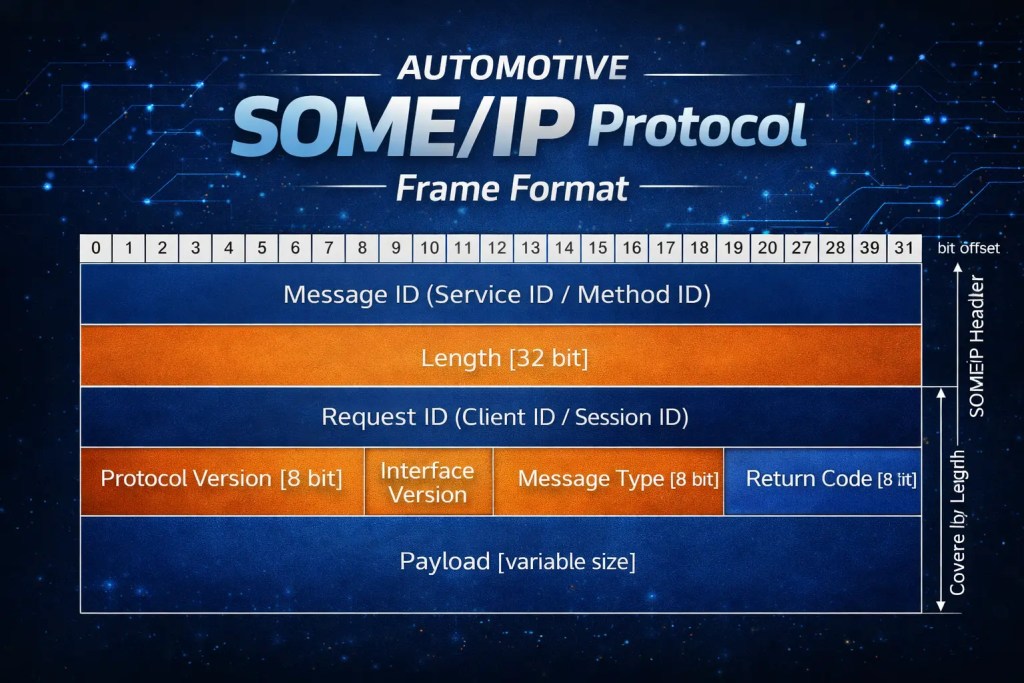
This fixed header makes SOME/IP fast to parse and consistent across ECUs and vendors. Regardless of whether you use TCP or UDP, the header structure stays the same.
1) SOME/IP Header Overview (16 Bytes Total)
The SOME/IP header is always 16 bytes and is composed of these parts:
- Message ID (32-bit)
- Length (32-bit)
- Request ID (32-bit)
- Protocol Version (8-bit)
- Interface Version (8-bit)
- Message Type (8-bit)
- Return Code (8-bit)
After these 16 bytes, the Payload begins.
2) Message ID (Service ID / Method ID) – 32 bit
Purpose: Identifies what service and what operation this message is for.
Structure:
- Service ID (16-bit): Unique identifier for the service interface (example: “VehicleSpeedService”).
- Method ID (16-bit): Identifies a method call, event, field getter/setter, or notification.
Developer meaning:
- This is the field you use to decide which handler function to call on the server side.
- Wireshark and CANoe decode this to show which service/method/event is being used.
Example (Conceptual)
If you have:
- Service:
VehicleSpeedService→Service ID = 0x1234 - Method:
GetSpeed()→Method ID = 0x0001
Then Message ID becomes:
0x1234 0001
This tells the receiver: “This is a request/response for GetSpeed() in VehicleSpeedService.”
3) Length – 32 bit
Purpose: Tells the receiver how many bytes follow after the Length field.
Important developer note (common bug):
- The SOME/IP “Length” field does not represent the full packet size.
- It is the length of:
- Request ID (4 bytes)
- Protocol/Interface/Type/Return (4 bytes)
- Payload (N bytes)
So effectively:
Length = 8 + PayloadLength
Why AUTOSAR does this:
- It allows a receiver to know the message boundary quickly, especially on TCP streams.
Example
If payload is 20 bytes:
Length = 8 + 20 = 28 bytes4) Request ID (Client ID / Session ID) – 32 bit
Purpose: This is the tracking ID used to correlate requests and responses.
Structure:
- Client ID (16-bit): Identifies the client ECU/application that originated the request.
- Session ID (16-bit): A sequence number chosen by the client to match request ↔ response pairs.
Developer meaning:
- When a client sends a request, it selects a new Session ID.
- When the server replies, it uses the same Request ID so the client can match the response.
Example workflow
- Client sends request with:
- Client ID =
0x00A1 - Session ID =
0x0025
- Client ID =
- Server responds with same Request ID:
0x00A1 0025
This is essential when multiple requests are in-flight at once.
5) Protocol Version – 8 bit
Purpose: Indicates the SOME/IP protocol version.
Developer meaning:
- In practice, this is typically a constant expected by both ends.
- If you receive an unsupported protocol version, you should reject or ignore the message.
Why it exists:
- Long-term compatibility across vehicle generations and vendor stacks.
6) Interface Version – 8 bit
Purpose: Indicates the version of the service interface (not the protocol itself).
Developer meaning:
- Used for service versioning.
- Allows a client to detect whether it’s talking to a compatible service interface.
Typical behavior:
- If the major interface version doesn’t match expected, clients treat it as incompatible.
- Minor version often allows backward compatible changes (OEM policy dependent).
7) Message Type – 8 bit
Purpose: Defines what kind of SOME/IP message this is.
This single field determines whether a message is:
- A request
- A response
- A one-way message
- An event notification
- An error reply
Common message type meanings (conceptual):
- Request: client calls a method
- Request No Return: fire-and-forget
- Notification/Event: server pushes an event update
- Response: server returns method result
- Error: server reports failure for a request
Developer meaning:
- Your receiver logic should branch primarily on:
- Message Type (how to treat message)
- Message ID (which handler)
8) Return Code – 8 bit
Purpose: Reports the result status for Response or Error messages.
Critical clarification:
- The Return Code field exists in every SOME/IP header, but it is only meaningful for:
- Response messages
- Error messages
- For Requests and Events, it is usually set to a default value and ignored.
Typical return meanings:
- OK / NOT_OK
- Unknown Service
- Unknown Method
- Not Ready
- Timeout (implementation dependent)
Developer meaning:
- If you get a Response with non-OK return code, you handle it similarly to a failed RPC call in software.
9) Payload – Variable size
Purpose: Contains the actual method parameters, event data, or field value.
Payload rules:
- Serialization is defined by AUTOSAR.
- Data is encoded in binary with strict rules for:
- Alignment
- Endianness
- Padding
- Arrays/strings/structs
Developer meaning:
- Payload decoding is where most bugs occur:
- Misaligned struct packing
- Incorrect array length handling
- Wrong endianness assumptions
- Your service definition (ARXML / IDL) must match payload layout exactly.
Example payloads
- Request payload: method input arguments
- Response payload: method return values
- Event payload: periodic sensor values (speed, RPM, temperature)
Developer-Friendly Full Example
Goal: Client calls GetSpeed().
- Client sends SOME/IP Request:
- Message ID: Service=VehicleSpeed, Method=GetSpeed
- Length: 8 + payloadLength (payload may be 0 if no args)
- Request ID: Client ID + Session ID
- Message Type: Request
- Payload: empty or args
- Server responds:
- Same Message ID
- Same Request ID
- Message Type: Response
- Return Code: OK
- Payload: speed value (serialized)
This request/response flow is the core of SOME/IP usage in real ECUs.
4. SOME/IP in AUTOSAR ECU Architecture
SOME/IP integrates tightly into the AUTOSAR stack:
| Layer | Description |
|---|---|
| Application (SW-C) | Business logic |
| RTE | AUTOSAR runtime |
| SOME/IP | Service middleware |
| SOME/IP-SD | Service discovery |
| SoAd | Socket adapter |
| TCP / UDP | Transport |
| IP / Ethernet | Network |
This allows AUTOSAR applications to communicate using services instead of signals.
5. Core Concepts of SOME/IP Protocol
5.1 Service
A service is a versioned interface contract.
- Identified by Service ID
- Has major and minor versions
- Describes methods, events, and fields
5.2 Service Instance
A runtime realization of a service:
- IP address
- Port
- Transport protocol
Multiple ECUs can offer the same service interface as different instances.
5.3 Client and Server
- Server provides the service
- Client consumes the service
- An ECU can be both client and server
This enables distributed, flexible architectures.
6. Communication Patterns in SOME/IP
SOME/IP supports four standardized communication patterns:
6.1 Request / Response (RPC)
- Client calls a method
- Server returns a response
- Used for commands and queries
Example:
Client requests vehicle speed → Server responds with speed value
6.2 Fire-and-Forget
- Client sends a request
- No response expected
Example:
Trigger seat heating without confirmation
6.3 Event Notification
- Server publishes events
- Subscribed clients receive updates
Example:
Radar detects object → event sent to multiple ECUs
6.4 Fields
Stateful data with:
- Get
- Set
- Notify on change
Example:
Current driving mode (Eco / Sport)
7. SOME/IP Protocol Message Format
Every SOME/IP message contains a fixed 16-byte header followed by a payload.
Header Fields:
- Message ID (Service ID + Method/Event ID)
- Length
- Request ID (Client ID + Session ID)
- Protocol Version
- Interface Version
- Message Type
- Return Code
This strict format ensures vendor-independent interoperability.
8. Serialization and Data Types
SOME/IP defines deterministic serialization rules.
Supported data types:
- Integers (8–64 bit)
- Floating point
- Structs
- Arrays
- Strings
- Enumerations
- Bitfields
- Optional members
- Unions / variants
Rules define:
- Alignment
- Endianness
- Padding
- Version compatibility
This makes SOME/IP predictable and safe for embedded systems.
9. Transport Protocols – UDP, TCP & SOME/IP-TP
9.1 UDP
- Low latency
- Multicast support
- Used for events & discovery
9.2 TCP
- Reliable
- Ordered delivery
- Used for large or critical data
9.3 SOME/IP-TP (Transport Protocol)
Used when payload exceeds UDP limits:
- Segmentation
- Reassembly
- Flow control
- Timeout handling
10. SOME/IP Service Discovery (SOME/IP-SD)
SOME/IP-SD enables dynamic discovery of services.
Core Functions:
- Find services
- Offer services
- Subscribe to event groups
- Control event transmission
Key Messages:
- FindService
- OfferService
- SubscribeEventGroup
- SubscribeEventGroupAck
Communication uses:
- UDP
- Multicast IP
- Standard SD port
11. Publish / Subscribe Model in SOME/IP
Using SOME/IP + SD:
- Clients subscribe only to needed events
- Network traffic is optimized
- Multicast is used efficiently
This model scales extremely well for ADAS and sensor-heavy systems.
12. Error Handling in SOME/IP Protocol
SOME/IP standardizes:
- Return codes
- Application errors
- Transport errors
- Timeout detection
This ensures deterministic failure handling, critical for automotive safety.
13. Security Considerations
While SOME/IP is transport-agnostic, AUTOSAR recommends:
- Secure Ethernet
- TLS / IPsec
- Authenticated service discovery
- Controlled multicast usage
Security is typically enforced below or around SOME/IP, not inside it.
14. Real-World Automotive Applications
SOME/IP is used in:
- ADAS sensor fusion
- Infotainment services
- Camera & radar data control
- OTA updates
- Diagnostics over IP (DoIP integration)
- Centralized vehicle computers
15. SOME/IP vs Classical Automotive Protocols
| Feature | CAN | FlexRay | SOME/IP |
|---|---|---|---|
| Architecture | Signal | Static | Service-oriented |
| Bandwidth | Low | Medium | High |
| Dynamic Discovery | No | No | Yes |
| Serialization | Implicit | Static | Explicit |
| Multicast | Limited | Limited | Native |
16. SOME/IP, DoIP, and AUTOSAR Adaptive
- SOME/IP: Application middleware
- DoIP: Diagnostic transport
- UDS runs over DoIP
- AUTOSAR Adaptive heavily relies on SOME/IP
Together, they form the foundation of modern software-defined vehicles.
17. Tools and Implementations
- vsomeip (reference implementation)
- Vector CANoe / CANalyzer
- AUTOSAR Classic & Adaptive stacks
- Automotive Ethernet ECUs

You must be logged in to post a comment.